Semrush MCP
Live SEO and marketing data in your AI assistants
Access Semrush’s full dataset right from Claude, ChatGPT, Perplexity, Gemini, and more. Ask in natural language. Get clear, data-backed answers.





How to use Semrush MCP
Read documentation1
Ensure you have MCP access
You’ll need an active Semrush subscription with API access to start using MCP.
2
Connect Semrush MCP to AI assistants
Link directly to ChatGPT, Claude, Perplexity, Gemini, Cursor, VS Code, Claude Code, and more.
3
Start prompting with Semrush data
Ask questions and complete tasks with live Semrush data right in your AI assistants.
What is Semrush MCP?
Semrush MCP is a way to use live Semrush data and tools directly in AI assistants like Claude, ChatGPT, Gemini, and more.
MCP stands for Model Context Protocol, a system that lets AI assistants connect to external tools and data sources, like Semrush.
Once connected, ask questions right in chat and get answers backed by Semrush’s live SEO and marketing data.
Complete your workflows in your favorite AI assistants
Connect once, then run Semrush data through the AI assistant you already use every day.






Follow the setup guide for your AI assistant
Unlock what you can do with Semrush MCP
Explore ready-to-use prompts for every workflow in the MCP prompt library. Copy and paste directly into your AI assistants.
Find in-demand keywords and spot search opportunities
Build a keyword strategy for your niche and see which competitors already own the terms you’re missing.
Prompt:
Using Semrush data for [country], analyze [niche]: build a keyword strategy, identify top organic competitors and content gaps; then summarize and prioritize.
Improve and expand existing content
Find your highest-impact pages to refresh, and know exactly what to fix first.
Prompt:
Improve existing content and find new opportunities for [domain] based on search trends and high-impact keywords:
- Identify 10 most critical pages to update, add, or remove
- Suggest improvements for each of these pages
- Propose new topics for articles based on the top 20 missing keywords
Create reports faster and drive decisions
Turn raw performance data into a report that’s ready for a client or leadership in minutes.
Prompt:
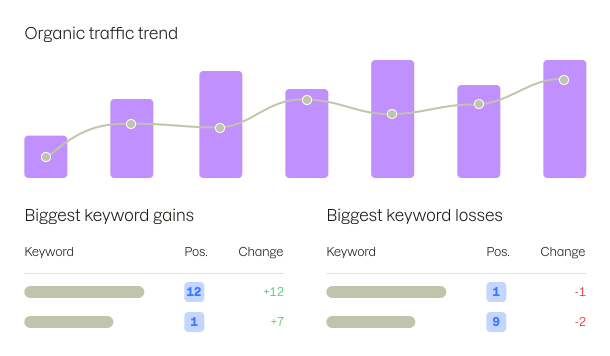
Using Semrush [country] data, generate a monthly SEO report for [domain]. Include estimated organic traffic, top landing pages, the biggest keyword gains and losses, and 3 recommended actions.
Access the world’s deepest search data
Now enhanced with AI insights and ready to use in your workflows.
29.2B
Keywords
142
Geo database
28M
Users who already tried Semrush
808M
Domain profiles
37M+
Brands
What users say about Semrush MCP
We use the Semrush MCP to research competitors and explore keyword opportunities in ChatGPT, then switch to VS Code to extract search volumes and top keywords at scale—across millions of URLs in 18 languages. It turns a question into an answer without writing a single line of code.

Gabriel Ortiz
SEO Specialist, Softonic

Andrea Schultz
SEO Director, Sure Oak
Connect Semrush MCP to ChatGPT, Claude, Cursor, and more
The setup process takes only a few clicks. Connect each AI assistant once and start prompting right away.
Step-by-step guides for every AI assistant.
FAQ
What is an MCP server?

An MCP (Model Context Protocol) is a server that lets AI assistants like ChatGPT, Claude, and Cursor connect securely to external tools, data, and services — no code required. It translates your requests automatically, so you get clear, immediate answers or completed tasks.
With Semrush MCP, connect your AI assistant to live Semrush data to target the right keywords, audit domains, track competitor and paid search moves, close backlink gaps, fix technical issues, and catch market shifts early.
How do I connect Semrush MCP with Claude?
Here’s how to connect Semrush MCP with Claude:
- Open Claude.
- Navigate Customize, then click Connectors.
- In the Search connectors bar, type Semrush.
- Click Connect.
- On a permission screen, review access request to your Semrush account, then click Approve.
Your Semrush data will be enabled within Claude. If you're having trouble while connecting, try our more detailed guide here.
How do I connect Semrush MCP with ChatGPT?
Here’s how to connect Semrush MCP with ChatGPT:
- Open ChatGPT.
- Navigate to Plugins.
- In the search bar, type and select Semrush.
- Click Install plugin, then click Continue.
- Review access request to your Semrush account, then click Continue.
Your Semrush data will be enabled within ChatGPT. See our detailed guide to learn more about the connection process.
How do I connect Semrush MCP with Cursor?
Here’s how to connect Semrush MCP with Cursor:
- Open Cursor.
- Navigate to Settings, then go to Cursor Settings.
- Click Tools & MCP and add the Semrush MCP configuration to your Cursor MCP settings.
- Your Semrush data will be enabled within Cursor.
You can copy the Semrush MCP configuration (JSON) right from our guide here.
How do I connect Semrush MCP with Perplexity?
Here's how to connect Semrush MCP with Perplexity:
- Open Perplexity.
- Navigate to Customize.
- In the Connectors search bar, type Semrush.
- Select Semrush listing and click Add Connector.
- Review access request to your Semrush account, then click Continue.
Your Semrush data will be enabled within Perplexity. Please note that you need a paid Perplexity account to connect Semrush MCP.
Check our detailed guide.
Which plan do I need to use Semrush MCP?
You'll need an active Semrush One, SEO Classic, or Trends API subscription to use Semrush MCP. Depending on your plan, you'll have a minimum of 50,000 MCP API units included, which reset every monthly billing cycle. If you need more units within the same billing cycle, you can always purchase additional ones.
Is Semrush MCP free?
No, Semrush MCP isn’t free. To start using it, you need to have one of the following active Semrush subscriptions:
- Semrush One Starter
- Semrush One Pro+
- SEO Classic Pro
- SEO Classic Guru
- SEO Classic Business with an API units package
- Semrush One Advanced with an API units package
Once you activate one of these subscriptions, you can connect Semrush MCP and start prompting in AI assistants immediately.
Does Semrush MCP require code?
No, Semrush MCP doesn't require code. Semrush MCP is available as an official app within ChatGPT (OpenAI), Claude, and Perplexity. You can connect your Semrush account data to them with two clicks directly within these AI assistants, following our detailed guide.
For Claude Code, Cursor, VS Code, and other AI assistants, you need to add the Semrush MCP configuration (JSON) in the settings, following the same guide.
Who do I contact if I need help setting up MCP?
Our Support Team and your Customer Success Manager are always here to help. Please use this link to contact us.
Start prompting with Semrush data in your AI assistants
Access Semrush’s full dataset right from Claude, ChatGPT, Perplexity, Gemini, and more. Ask in natural language. Get clear, data-backed answers.